07 문자
정보
💡 리소스파일
문자관련스타일
01. font
단위
👁🗨 상대단위들
| 단위 | 기준 | |
|---|---|---|
| em | 부모 요소 기준 | 단위환산사이트 |
| rem | :root(html) 기준 (루트→최상위) | |
| vh | 브라우저 화면 높이기준 (viewportHeight→vh) | (폰트크기 x 브라우저높이) / 100 |
| vw | 브라우저 화면 너비기준(viewportWidth→vw) | (폰트크기 x 브라우저너비) / 100 |
| % | 부모요소 기준 |
121p
정보
👁️🗨️ 글꼴지정속성
1font-family: "Times New Roman",sans-serif;- sans-serif=> 앞에 정의한 글꼴이 없으면 시스템 기본 글꼴 중 고딕체 아무거나
- 여러 단어 이거나 한글 글꼴 인 경우 따옴표로 감쌈
- 여러개의 글꼴은 쉼표로 구분
- “Times New Roman” , arial, ”돋움” ⇒ 지정된 글꼴이 없을경우 다음 글꼴로 지정됨
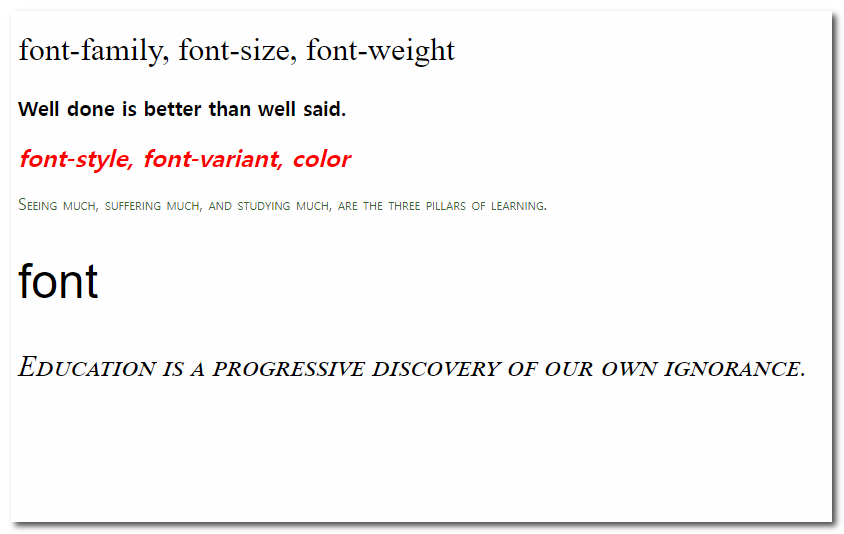
1<div id="box1">2 <h2>font-family, font-size, font-weight</h2>3 <p>Well done is better than well said.</p>4 </div>5 <div id="box2">6 <h2>font-style, font-variant, color</h2>7 <p>Seeing much, suffering much, and studying much, are the three pillars of learning. </p>8 </div>9 <div id="box3">10 <h2>font</h2>11 <p>Education is a progressive discovery of our own ignorance. </p>12 </div>1<!DOCTYPE html>2<html lang="ko">3 <head>4 <meta charset="UTF-8" />5 <meta http-equiv="X-UA-Compatible" content="IE=edge" />6 <meta name="viewport" content="width=device-width, initial-scale=1.0" />7 <title>font-family</title>8 <style>9 #box1 h2 {10 /* 앞에 정의한 글꼴이 없으면 시스템 기본 글꼴 중 고딕체, 명조체 아무거나 */11 font-family: "Times New Roman", serif;12 font-size:2em;13 font-weight: normal;14 }15 #box1 p{16 font-family: Georgia, 'Times New Roman', Times, serif;17 font-size:20px;18 font-weight: bold;19 }20 #box2 h2{21 font-style: italic;22 color:red;23 }24 #box2 p{25 font-variant: small-caps;26 color:#336633;27 }28 #box3 h2{29 font:3em Arial;30 }31 #box3 p{32 font:small-caps 30px "Times New Roman";33 }34 </style>35 </head>36 <body>37 <div id="box1">38 <h2>한글 font-family, font-size, font-weight</h2>39 <p>Well done is better than well said.</p>40 </div>41 <div id="box2">42 <h2>한글font-style, font-variant, color</h2>43 <p>44 Seeing much, suffering much, and studying much, are the three pillars of45 learning.46 </p>47 </div>48 <div id="box3">49 <h2>font</h2>50 <p>Education is a progressive discovery of our own ignorance.</p>51 </div>52 </body>53</html>02. font-face, font-size
121p
정보
👁️🗨️ font-size 글씨크기
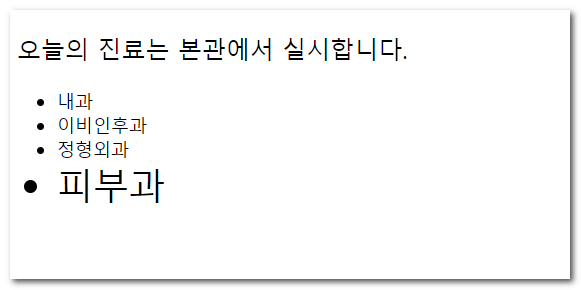
1오늘의 진료는 본관에서 실시합니다.2
3내과4이비인후과5정형외과6피부과1<!DOCTYPE html>2<html lang="ko">3<head>4 <meta charset="UTF-8">5 <meta http-equiv="X-UA-Compatible" content="IE=edge">6 <meta name="viewport" content="width=device-width, initial-scale=1.0">7 <title>글자의단위</title>8 <style>9 html{font-size: 24px;}10 ul{font-size: 12px;}11 li{font-size: 1.5em;}12 /* rootem */13 li:nth-child(4){font-size: 1.5rem;}14 </style>15</head>16<body>17 <p>오늘의 진료는 본관에서 실시합니다.</p>18 <ul>19 <li>내과</li>20 <li>이비인후과</li>21 <li>정형외과</li>22 <li>피부과</li>23 </ul>24</body>25</html>03. font-weight, font-style, font-variant, line-height
126p
정보
👁️🗨️ font-weight : 글씨 두께
font-style : 기울기 font-variant : 대소문자 line-height : 행간
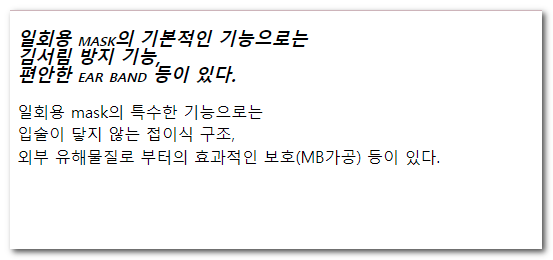
1일회용 mask의 기본적인 기능으로는2김서림 방지 기능,3편안한 ear band 등이 있다.4
5일회용 mask의 특수한 기능으로는6입술이 닿지 않는 접이식 구조,7외부 유해물질로 부터의 효과적인 보호(MB가공) 등이 있다.1<!DOCTYPE html>2<html lang="ko">3 <head>4 <meta charset="UTF-8" />5 <meta http-equiv="X-UA-Compatible" content="IE=edge" />6 <meta name="viewport" content="width=device-width, initial-scale=1.0" />7 <title>Document</title>8 <style>9 p{10 font-size: 18px;11 font-weight: bold;12 font-style: italic;13 font-variant: small-caps;14 line-height: 1.5;15 line-height: 1;16 line-height: 150%;17 width:200px;18 }19 </style>20 </head>21 <body>22 <p>23 일회용 mask의 기본적인 기능으로는 김서림 방지 기능, 편안한 ear band 등이24 있다.25 </p>26
27 <p class="font2">28 일회용 mask의 특수한 기능으로는 입술이 닿지 않는 접이식 구조, 외부29 유해물질로 부터의 효과적인 보호(MB가공) 등이 있다.30 </p>31
32 </body>33</html>ex2-20-1
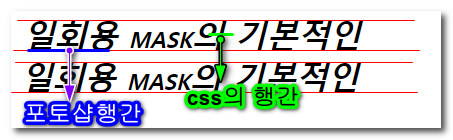
1<!DOCTYPE html>2<html lang="ko">3<head>4 <meta charset="UTF-8">5 <meta http-equiv="X-UA-Compatible" content="IE=edge">6 <meta name="viewport" content="width=device-width, initial-scale=1.0">7 <title>Document</title>8 <style>9 p{10 font-size: 5vw;11 }12 </style>13</head>14<body>15 <p>웹브라우저 높이기준: vw</p>16 <p>(폰트크기x브라우저높이)/100</p>17 <p>(5*900)/100 =45px</p>18</body>19</html>👁🗨 포토샵과 css의 line-height 차이
https://slowalk.com/2194 참조블로그
04. font
128p
정보
👁️🗨️ 축약속성
font: [ font-weight, font-style, font-variant ] [ font-size/line-heignt ] [ font-family ]
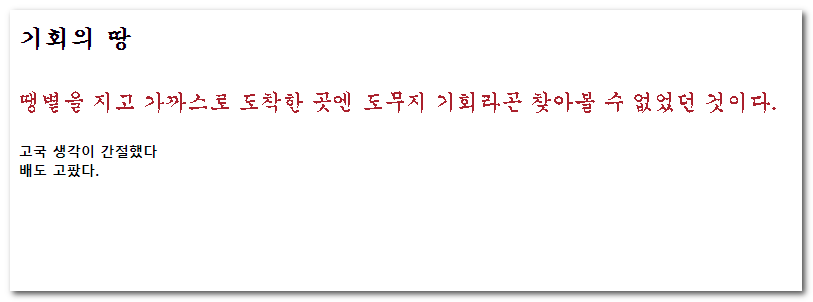
1기회의 땅2땡볕을 지고 가까스로 도착한 곳엔 도무지 기회라곤 찾아볼 수 없었던 것이다.3
4고국 생각이 간절했다5배도 고팠다.1<!DOCTYPE html>2<html lang="ko">3 <head>4 <meta charset="UTF-8" />5 <meta http-equiv="X-UA-Compatible" content="IE=edge" />6 <meta name="viewport" content="width=device-width, initial-scale=1.0" />7 <title>font</title>8 <style>9 body {10 font: 20px/1.6 "궁서", Gungseo;11 }12 h3{13 font-size:23px;14 }15 p{16 color:brown;17 }18 .ps{19 font: bold 13px/1.3 "맑은 고딕","Malgun Gothic", Helvetica;20 color:black;21 }22 </style>23 </head>24 <body>25 <h3>기회의 땅</h3>26 <p>27 땡볕을 지고 가까스로 도착한 곳엔 도무지 기회라곤 찾아볼 수 없었던 것이다.28 </p>29
30 <p class="ps">31 고국 생각이 간절했다. <br />32 배도 고팠다.33 </p>34 </body>35</html>05. 웹폰트
정보
👁️🗨️ 한글
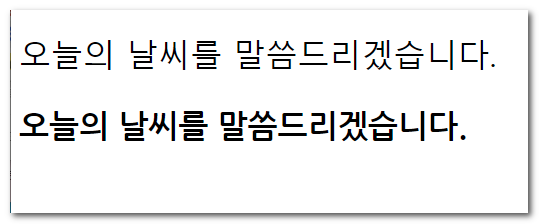
1오늘의 날씨를 말씀드리겠습니다.2
3오늘의 날씨를 말씀드리겠습니다.1<!DOCTYPE html>2<html lang="ko">3 <head>4 <meta charset="UTF-8" />5 <meta http-equiv="X-UA-Compatible" content="IE=edge" />6 <meta name="viewport" content="width=device-width, initial-scale=1.0" />7 <title>Document</title>8
9 <link rel="preconnect" href="https://fonts.googleapis.com" />10 <link rel="preconnect" href="https://fonts.gstatic.com" crossorigin />11 <link12 href="https://fonts.googleapis.com/css2?family=Montserrat:wght@500;600&family=Splash&display=swap"13 rel="stylesheet"14 />15 <link16 rel="stylesheet"17 href="https://fonts.googleapis.com/css2?family=Material+Symbols+Outlined:opsz,wght,FILL,GRAD@48,400,0,0"18 />19 <style>20 @font-face {21 font-family: "PyeongChangPeace-Bold";22 src: url("https://cdn.jsdelivr.net/gh/projectnoonnu/noonfonts_2206-02@1.0/PyeongChangPeace-Bold.woff2")23 format("woff2");24 font-weight: 700;25 font-style: normal;26 }27 p:nth-child(1) {28 font-family: "PyeongChangPeace-Bold";29 }30 .en1 {31 font-family: "Montserrat", sans-serif;32 font-weight: 500;33 }34 .en2 {35 font-family: "Splash", cursive;36 }37 .material-symbols-outlined:hover{38 color:red;39 }40 </style>41 </head>42 <body>43 <span class="material-symbols-outlined">44 search45 </span>46 <p>오늘의 날씨를 말씀드리겠습니다.</p>47 <p>오늘의 날씨를 말씀드리겠습니다.</p>48
49 <p class="en1">Lorem Ipsum</p>50 <p class="en2">simply dummy</p>51 <p class="en3">printing and types</p>52 </body>53</html>👸폰트페이스
-
예제파일
-
폰트 파일 확장자별 특징
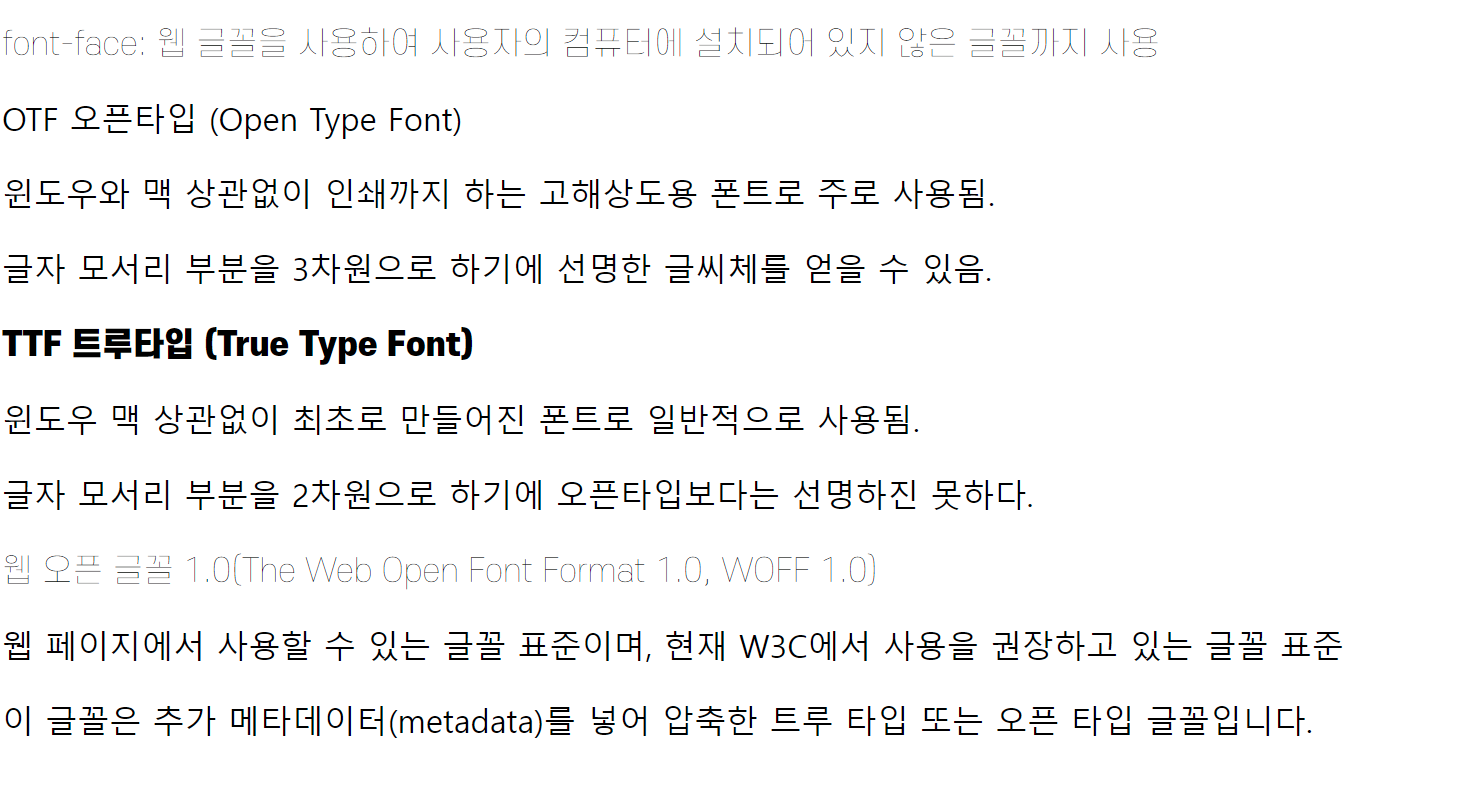
- 문법 🔗MDN
@font-face { font-family: <a-remote-font-name>; src: <source> [,<source>]*; [font-weight: <weight>]; [font-style: <style>];}- 선언순서 : 파일의 크기 순으로 추천
1.eot, .woff, ttf, .svg06. 쌤한테 파비콘만들자고하기
07. color
134p
정보
👁️🗨️ 다양한 색상표현들
| 표기법 | 설명 | 속성값 작성예시 | 불투명도추가 |
|---|---|---|---|
| 관용색명 | 색상명사 | red, pink … | |
| hex | rgb 색상의 16진수 표기법 | #ffffff, #000000 … | #ff00009c |
| rgb | red,green,blue 채널의 10진수 표기 | ||
| 0~255 | rgb(255,255,255) | rgba(255,255,255,0.8) | |
| hsl | hue, saturation, lightness 값 | ||
| 0 | hsl(0,100%,100%) | hsla(0,100%,100%,0.8) |
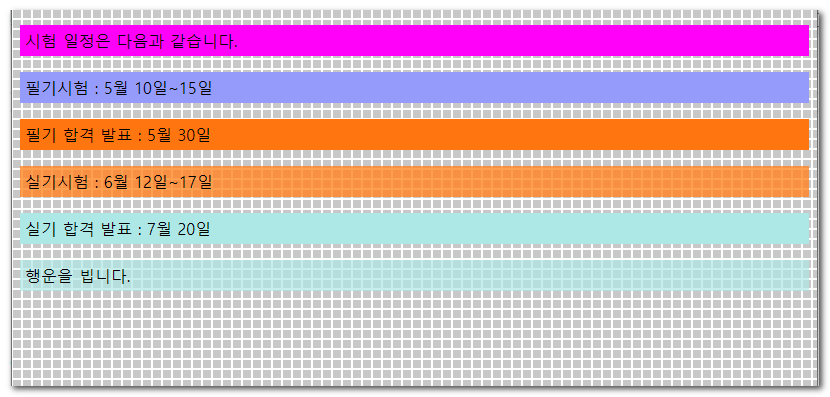
1<p class="color1">시험 일정은 다음과 같습니다.</p>2<p class="color2">필기시험 : 5월 10일~15일</p>3<p class="color3">필기 합격 발표 : 5월 30일</p>4<p class="color4">실기시험 : 6월 12일~17일</p>5<p class="color5">실기 합격 발표 : 7월 20일</p>6<p class="color6">행운을 빕니다.</p>1<!DOCTYPE html>2<html lang="ko">3 <head>4 <meta charset="UTF-8" />5 <meta http-equiv="X-UA-Compatible" content="IE=edge" />6 <meta name="viewport" content="width=device-width, initial-scale=1.0" />7 <title>color</title>8 <style>9 body{background: url(img/bg_grid2.gif);}10 p{padding:5px;}11 .color1{background:magenta;}12 .color2{background:#9999ff;}13 .color3{background:rgb(163, 229, 77);}14 .color4{background:hsl(180,50%,50%);}15 .color5{background:rgba(180,255,255,0.5);}16 .color6{background:hsla(180,50%,50%,.8);}17 .color7{background:#9999ffca;}18 </style>19 </head>20 <body>21 <p class="color1">시험 일정은 다음과 같습니다.</p>22 <p class="color2">필기시험 : 5월 10일~15일</p>23 <p class="color3">필기 합격 발표 : 5월 30일</p>24 <p class="color4">실기시험 : 6월 12일~17일</p>25 <p class="color5">실기 합격 발표 : 7월 20일</p>26 <p class="color6">행운을 빕니다.</p>27 <p class="color6">행운을 빕니다.</p>28 <p class="color7">행운을 빕니다.</p>29 </body>30</html>08. letter-spacing, word-spacing
포토샵의 자간 : 문자 크기에 상대적인 측정 단위인 1/1000em 포토샵의 1000이 CSS의 1em(현재 폰트크기)과 일치
정보
👁️🗨️ letter-spacing : 글자간의 간격
word-spacing : 단어간의 간격
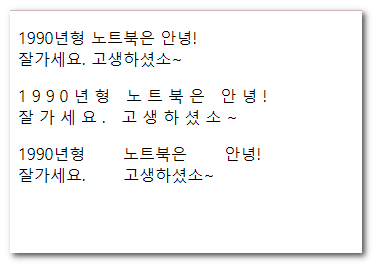
1<p> 1990년형 노트북은 안녕!<br> 잘가세요. 고생하셨소~ </p>2<p class="letter2">3 1990년형 노트북은 안녕!<br> 잘가세요. 고생하셨소~ </p>4<p class="letter3">5 1990년형 노트북은 안녕!<br> 잘가세요. 고생하셨소~ </p>1<!DOCTYPE html>2<html lang="ko">3 <head>4 <meta charset="UTF-8" />5 <meta http-equiv="X-UA-Compatible" content="IE=edge" />6 <meta name="viewport" content="width=device-width, initial-scale=1.0" />7 <title>자간과 단어간격</title>8 <style>9 .letter2{10 letter-spacing: 5px;11 }12 .letter3{13 word-spacing: 2em;14 }15 </style>16 </head>17 <body>18 <p>19 1990년형 노트북은 안녕!<br />20 잘가세요. 고생하셨소~21 </p>22 <p class="letter2">23 1990년형 노트북은 안녕!<br />24 잘가세요. 고생하셨소~25 </p>26 <p class="letter3">27 1990년형 노트북은 안녕!<br />28 잘가세요. 고생하셨소~29 </p>30 </body>31</html>09. text-decoration, text-transform
정보
👁️🗨️ text-decoration ⇒밑줄속성
- underline
- overline
- line-through
- none text-transform⇒ 대소문자
- uppercase
- lowercase
- capitalize
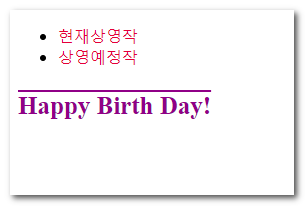
1<ul>2 <li><a href="#">현재상영작</a></li>3 <li><a href="#">상영예정작</a></li>4</ul>5<p>happy birth day!</p>1<!DOCTYPE html>2<html lang="ko">3 <head>4 <meta charset="UTF-8" />5 <meta http-equiv="X-UA-Compatible" content="IE=edge" />6 <meta name="viewport" content="width=device-width, initial-scale=1.0" />7 <title>text-decoration, text-transform</title>8 <style>9 a{10 text-decoration: none;11 color:cornflowerblue;12 }13 a:hover{14 text-decoration: underline;15 }16 p{17 text-decoration: overline;18 text-transform: lowercase;19 text-transform: uppercase;20 text-transform: capitalize;21 color:darkmagenta;22 font-family: 'Times New Roman', Times, serif;23 font-weight: bold;24 font-size: 25px;25 font:bold 25px 'Times New Roman';26 }27 </style>28 </head>29 <body>30 <ul>31 <li><a href="#">현재상영작</a></li>32 <li><a href="#">상영예정작</a></li>33 </ul>34 <p>happy birth day!</p>35 </body>36</html>10. text-shadow
정보
👁️🗨️ 글자의 그림자 지정
- 작성예시
text-shadow: 1px 1px 2px pink;
- 속성값 순서 →
x y blur color - 여러개 적용시
text-shadow: 1px 1px 2px red, 0 0 1em blue, 0 0 0.2em blue;
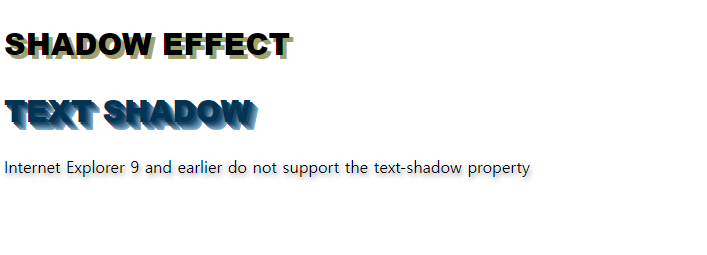
1<h2 class="shadow1">SHADOW EFFECT</h2>2 <h2 class="shadow2">TEXT SHADOW</h2>3 <p>4 Internet Explorer 9 and earlier5 do not support the text-shadow property6 </p>1<!DOCTYPE html>2<html lang="ko">3 <head>4 <meta charset="UTF-8" />5 <meta http-equiv="X-UA-Compatible" content="IE=edge" />6 <meta name="viewport" content="width=device-width, initial-scale=1.0" />7 <title>Document</title>8 <style>9 .shadow1 {10 font: 30px "Arial Black";11 text-shadow: -4px 4px 4px rgba(100, 100, 0, 0.6);12 }13 .shadow2 {14 font: 30px "Arial Black";15 color: #135;16 text-shadow: 2px 2px #246, 3px 3px #357, 4px 4px #468, 5px 5px #579, 6px 6px #68a, 7px 7px #79b, 8px 8px #8ac;17 }18 p{19 text-shadow: 2px 3px 5px rgba(0,0,0,.4) ;20 }21 </style>22 </head>23 <body>24 <h2 class="shadow1">SHADOW EFFECT</h2>25 <h2 class="shadow2">TEXT SHADOW</h2>26 <p>27 Internet Explorer 9 and earlier do not support the text-shadow property28 </p>29 </body>30</html>형성퀴즈1
정보
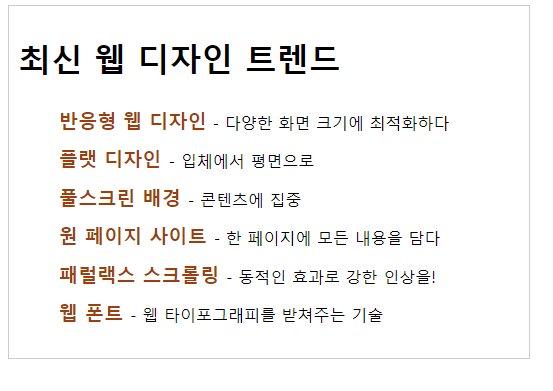
📢 주어진 리소스 파일을 이용하여 아래와 같은 화면을 구현하시오
완성화면
리소스파일
1최신 웹 디자인 트렌드2반응형 웹 디자인 - 다양한 화면 크기에 최적화하다3플랫 디자인 - 입체에서 평면으로4풀스크린 배경 - 콘텐츠에 집중5원 페이지 사이트 - 한 페이지에 모든 내용을 담다6패럴랙스 스크롤링 - 동적인 효과로 강한 인상을!7웹 폰트 - 웹 타이포그래피를 받쳐주는 기술형성퀴즈2
정보
📢 주어진 리소스 파일을 이용하여 아래와 같은 화면을 구현하시오
완성화면
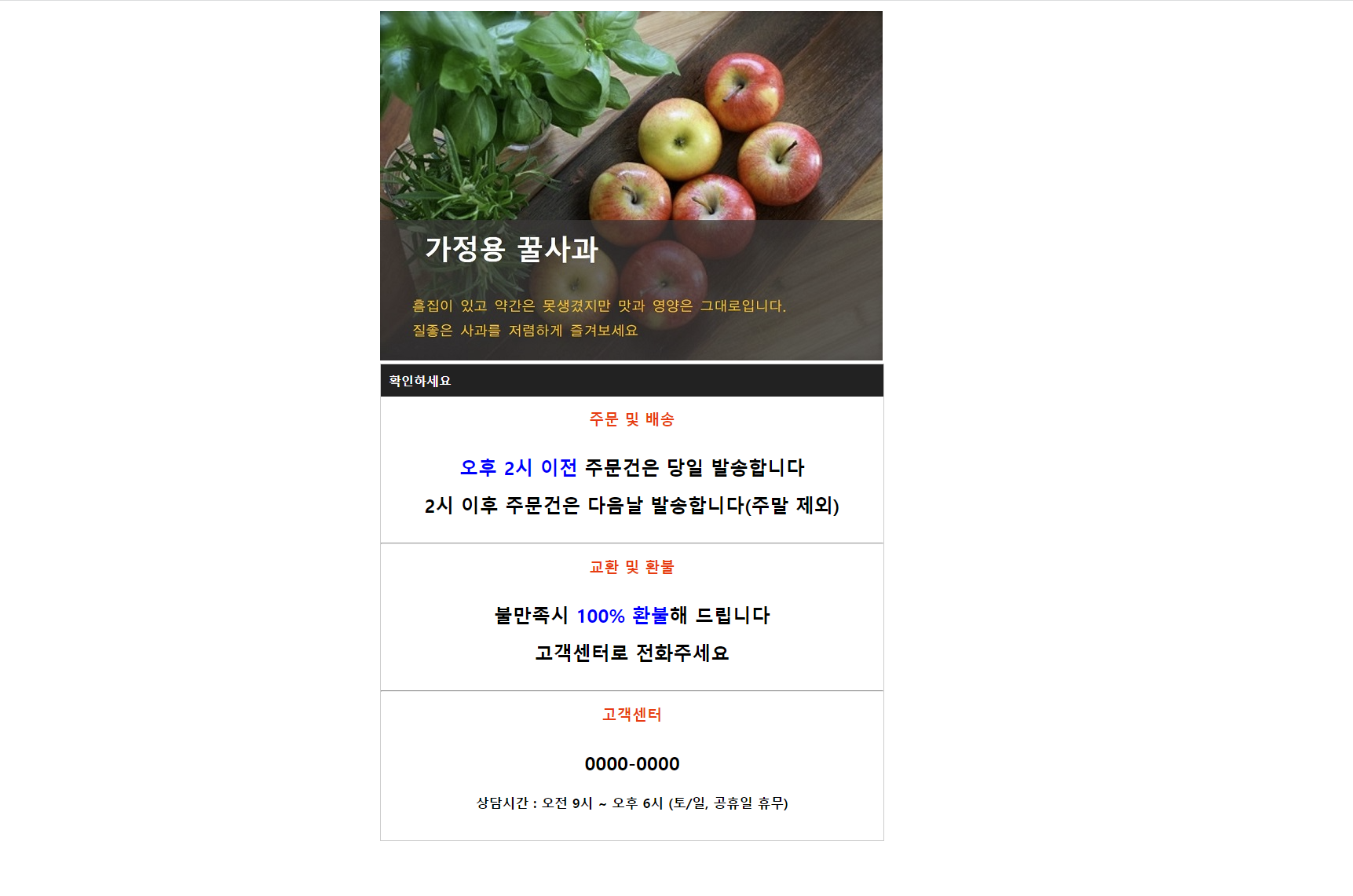
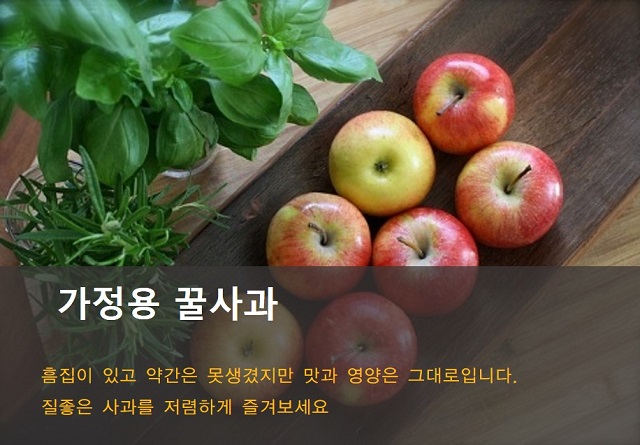
리소스파일
확인하세요주문 및 배송오후 2시 이전 주문건은 당일 발송합니다2시 이후 주문건은 다음날 발송합니다(주말 제외)
교환 및 환불불만족시 100% 환불해 드립니다고객센터로 전화주세요
고객센터0000-0000상담시간 : 오전 9시 ~ 오후 6시 (토/일, 공휴일 휴무)