13 박스모델
CSS BOXMODEL
정보
👁️🗨️ **css의 박스모델 **
레이아웃을 제작하는데 있어 굉장히 중요한 개념으로 이 챕터를 이해못하면 아무것도 할수없음
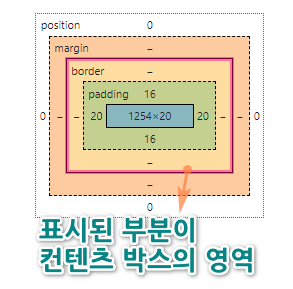
01. width,height
정보
👁️🗨️
| 속성값 | 속성설명 |
|---|---|
| width : 800px | 요소의 가로 800px |
| height : 100% | 요소의 세로 부모의 100% |
| min-width : 1024px | 요소의 최소가로 1024px |
| min-height : 200px | 요소의 최소세로 200px |
| max-width : 414px | 요소의 최대가로 414px |
| max-height: 591px | 요소의 최대높이 591px |
✔ BOXMODEL
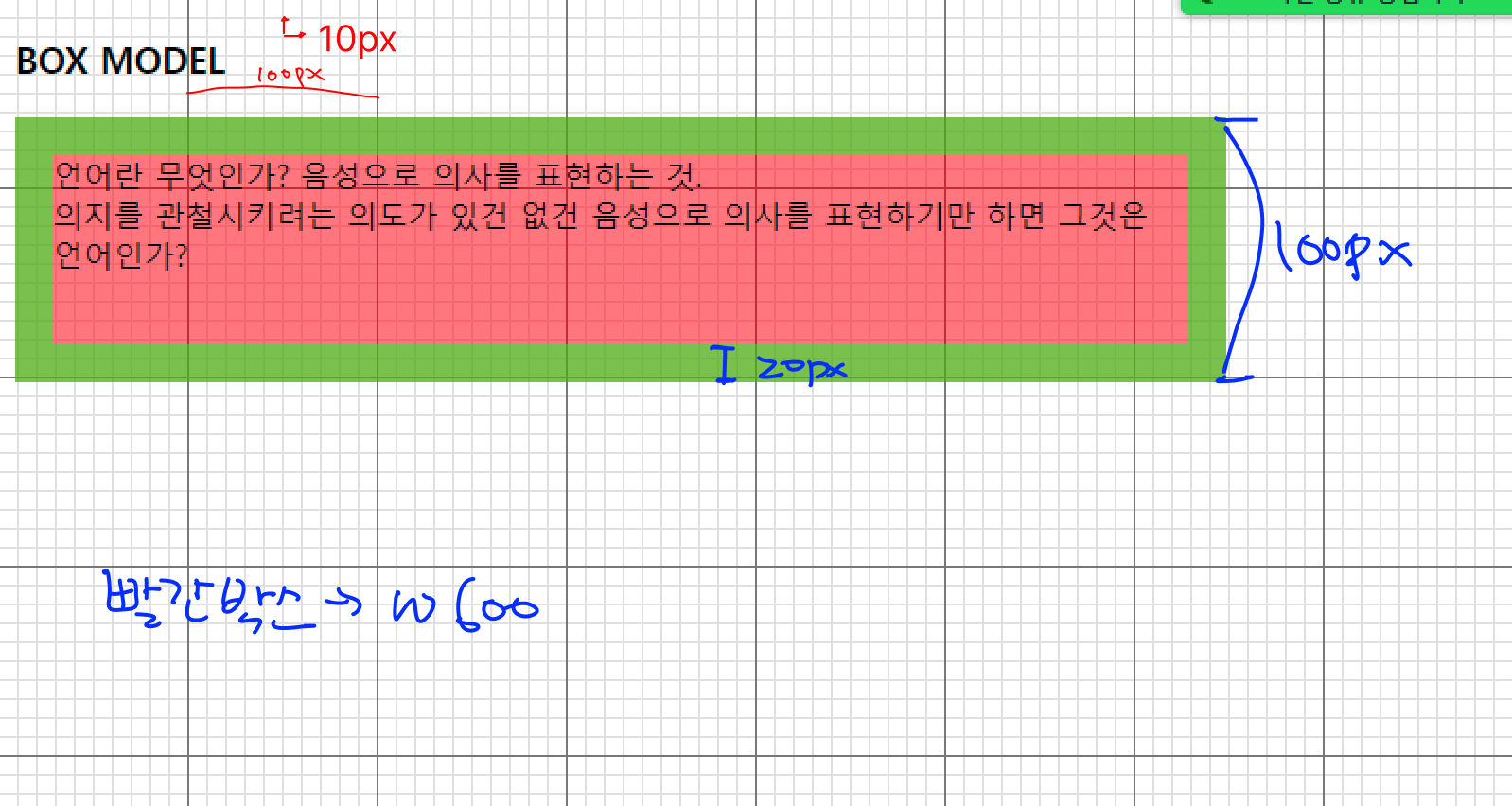
- 배경이미지 모눈 한개의 크기는 10px 입니다. (모눈의 눈금을 보고 박스의 크기를 확인하세요)
- 빨간 박스의 너비는 600px
- 초록색 테두리는 20px
- 박스의 총 높이는 100px 조건에 맞는 박스를 만들어보세요
1<!DOCTYPE html>2<html lang="ko">3<head>4<meta charset="utf-8">5<title>요소의 크기</title>6<style type="text/css">7
8</style>9</head>10<body>11 <h3>BOX MODEL</h3>12 <p>언어란 무엇인가? 음성으로 의사를 표현하는 것.<br> 의지를 관철시키려는 의도가 있건 없건 음성으로 의사를 표현하기만 하면 그것은 언어인가?</p>13</body>14</html>1<!DOCTYPE html>2<html lang="ko">3<head>4<meta charset="utf-8">5<title>요소의 크기</title>6<style type="text/css">7 body{8 background:url(img/bg_grid.gif) ;9 }10 p{11 background-color: rgba(255,0,0,.5);12 width:600px;13 /* 박스의 최소높이 100px 고정 */14 min-height: 100px;15 border: 20px solid rgba(0,255,0,.5);16 /* width:640px */17 }18</style>19</head>20<body>21
22 <h3>BOX MODEL</h3>23 <p>언어란 무엇인가? 음성으로 의사를 표현하는 것.<br>언어란 무엇인가? 음성으로 의사를 표현하는 것.<br>언어란 무엇인가? 음성으로 의사를 표현하는 것.</p>24</body>25</html>02. padding 🔗박스모델보기
- 속성값 1개 작성
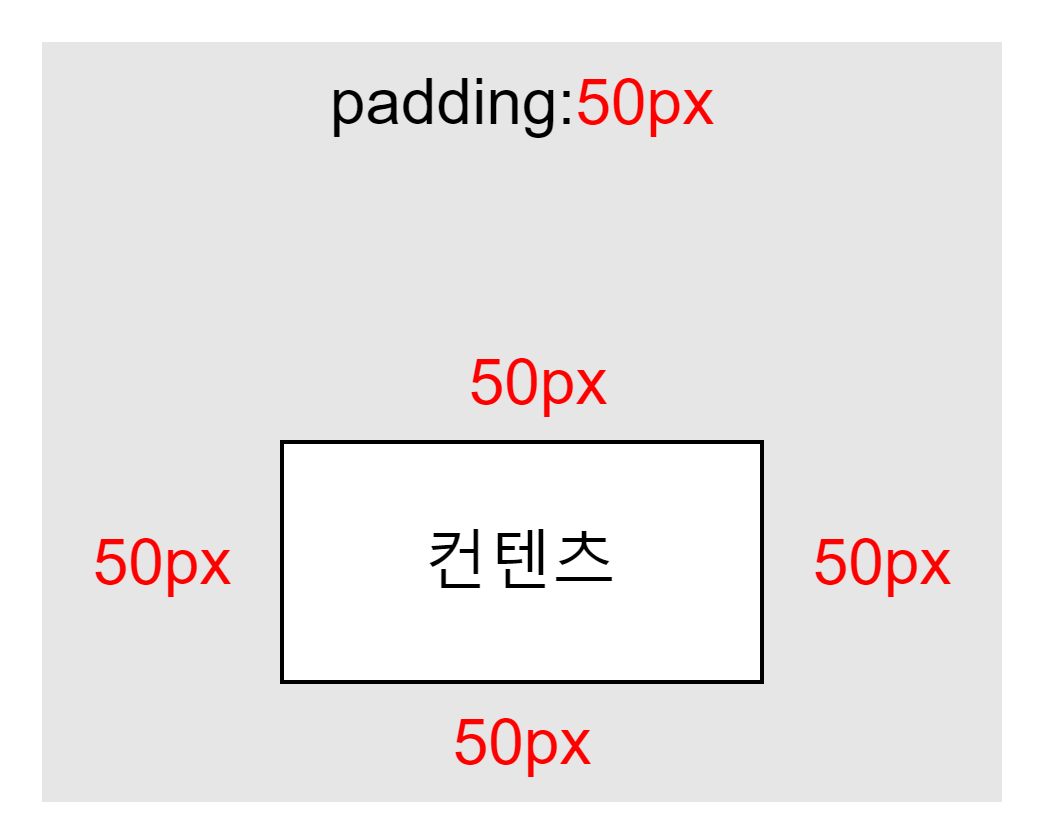
- 속성값 2개 작성
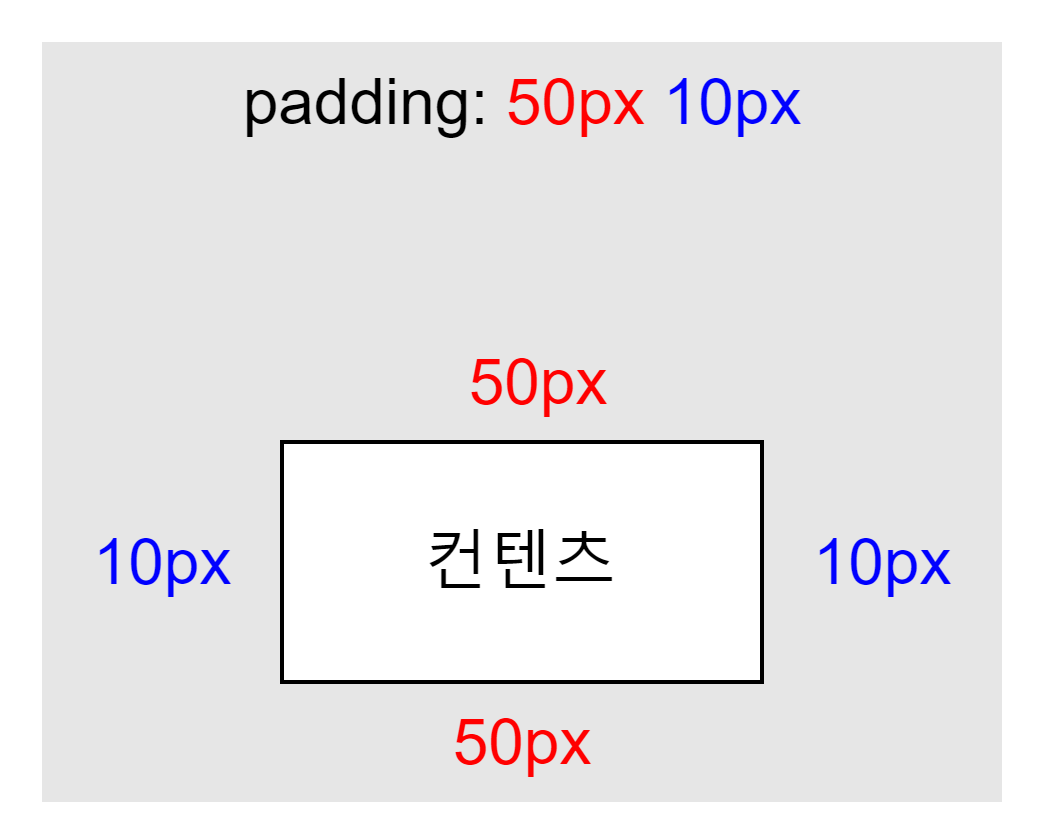
- 속성값 3개 작성
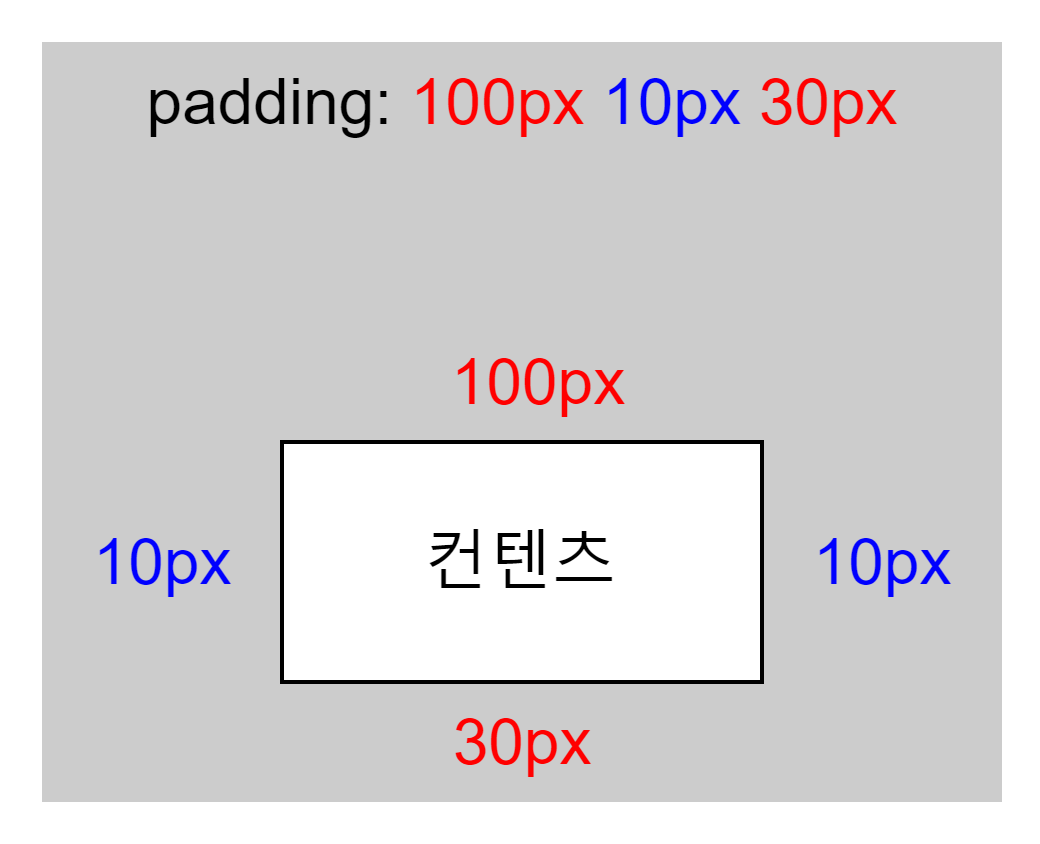
- 속성값 4개 작성
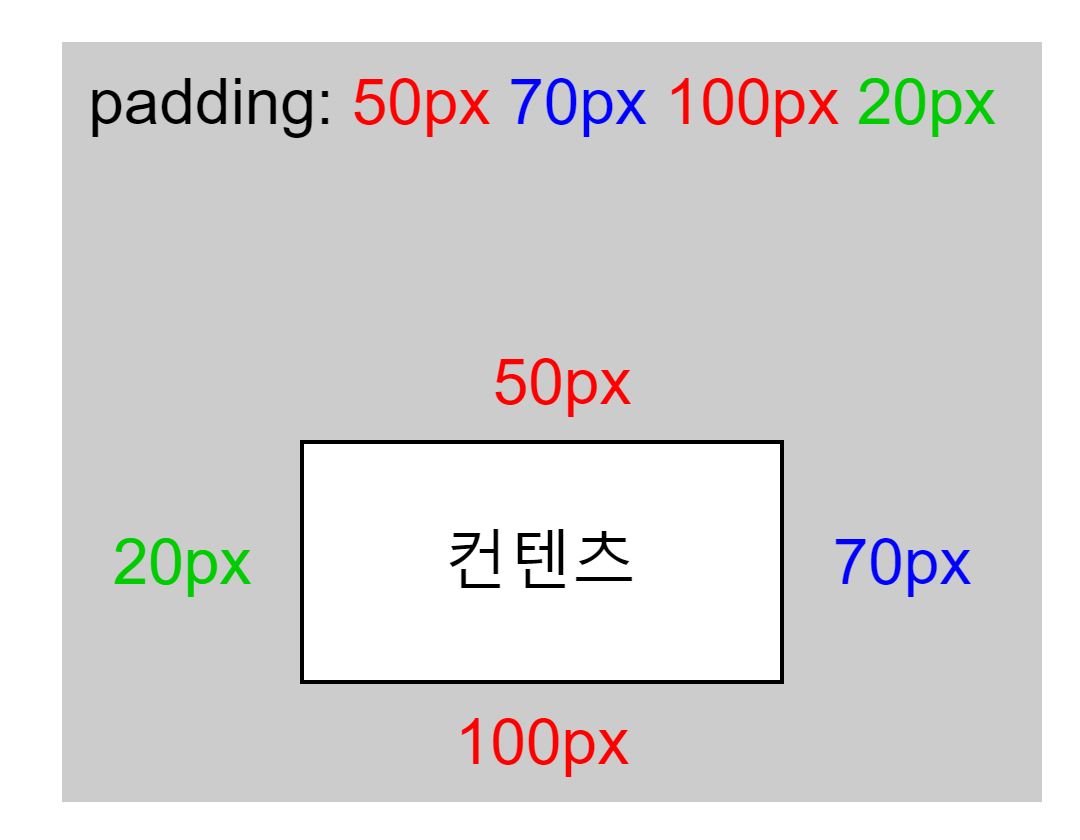
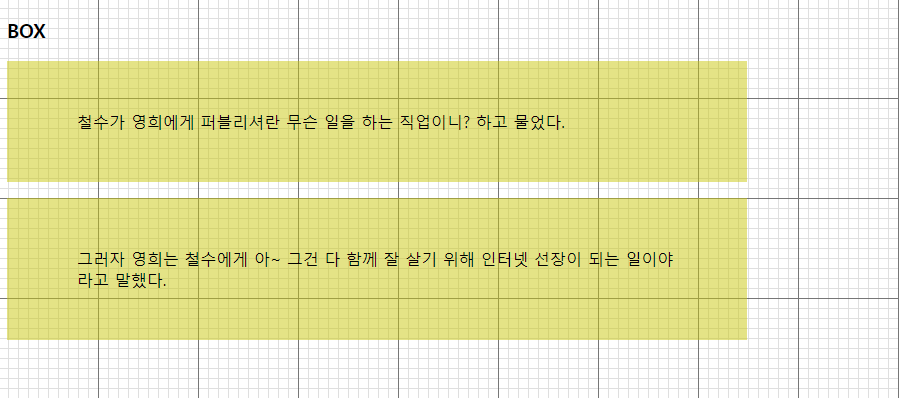
1<!DOCTYPE html>2<html lang="ko">3<head>4<meta charset="utf-8">5<title>요소의 안 여백</title>6<style type="text/css">7    body {8        background: url(img/bg_grid.gif);9        font:16px "Malgun Gothic";10    }11
12</style>13</head>14<body>15 <h3>BOX</h3>16 <p>철수가 영희에게 퍼블리셔란 무슨 일을 하는 직업이니? 하고 물었다.</p>17 <p>그러자 영희는 철수에게 아~ 그건 다 함께 잘 살기 위해 인터넷 선장이 되는 일이야 라고 말했다.</p>18</body>19</html>1<!DOCTYPE html>2<html lang="ko">3<head>4<meta charset="utf-8">5<title>요소의 안 여백</title>6<style type="text/css">7 body {8 background: url(img/bg_grid.gif);9 font:16px "Malgun Gothic";10 }11 p{12 background: rgba(200,200,0,.5);13 /* 너비를 600px로 ! */14 width: 600px;15 height:100px;16 padding:50px 70px;17 padding:50px 70px 100px;18 padding:50px 70px 100px 20px;19 }20</style>21</head>22<body>23 <h3>BOX</h3>24 <p>철수가 영희에게 퍼블리셔란 무슨 일을 하는 직업이니? 하고 물었다.</p>25 <p>그러자 영희는 철수에게 아~ 그건 다 함께 잘 살기 위해 인터넷 선장이 되는 일이야 라고 말했다.</p>26</body>27</html>03. margin 🔗박스모델보기
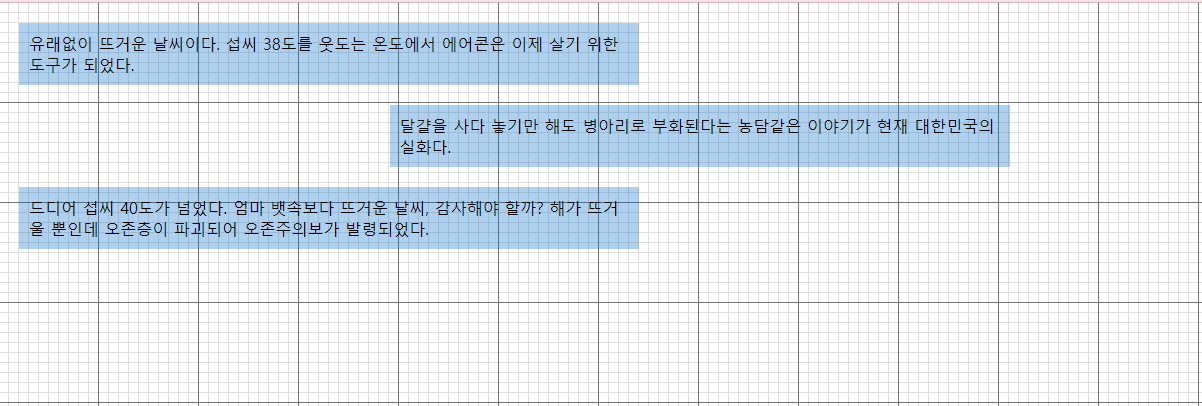
1<!DOCTYPE html>2<html lang="ko">3<head>4<meta charset="utf-8">5<title>요소의 바깥 여백</title>6<style type="text/css">7 body { background:url(img/bg_grid.png); }8</style>9</head>10<body>11 <p>유래없이 뜨거운 날씨이다. 섭씨 38도를 웃도는 온도에서 에어콘은 이제 살기 위한 도구가 되었다.</p>12 <p class="art2">달걀을 사다 놓기만 해도 병아리로 부화된다는 농담같은 이야기가 현재 대한민국의 실화다.</p>13 <p>드디어 섭씨 40도가 넘었다. 엄마 뱃속보다 뜨거운 날씨, 감사해야 할까? 해가 뜨거울 뿐인데 오존층이 파괴되어 오존주의보가 발령되었다.</p>14</body>15</html>1<!DOCTYPE html>2<html lang="ko">3 <head>4 <meta charset="utf-8" />5 <title>요소의 바깥 여백</title>6 <style type="text/css">7 body {8 background: url(img/bg_grid.png);9 }10 p{11 background: rgba(0,100,200,.3);12 width:600px;13 padding:10px;14 /* 상단마진겹칩현상발생15 상하 마진 적용시 위/아래 한쪽방향으로만 코딩16 */17 margin:20px;18 /* 큰값으로 합체 */19 margin-top:50px;20 }21 .art2{22 /* 마진으로 중앙정렬은 수평만 가능23 1. 너비가 있다.24 2. 좌우를 auto 로 준다.25 */26 width:300px;27 margin: 0 auto;28
29 margin-top: 0;30 margin-right: auto;31 margin-bottom: 0;32 margin-left: auto;33 }34 </style>35 </head>36 <body>37 <p>38 유래없이 뜨거운 날씨이다. 섭씨 38도를 웃도는 온도에서 에어콘은 이제 살기39 위한 도구가 되었다.40 </p>41 <p class="art2">42 달걀을 사다 놓기만 해도 병아리로 부화된다는 농담같은 이야기가 현재43 대한민국의 실화다.44 </p>45 <p>46 드디어 섭씨 40도가 넘었다. 엄마 뱃속보다 뜨거운 날씨, 감사해야 할까? 해가47 뜨거울 뿐인데 오존층이 파괴되어 오존주의보가 발령되었다.48 </p>49 </body>50</html>04. border 🔗박스모델보기
정보
👁️🗨️ border 와 outline 에 대해 알아보자
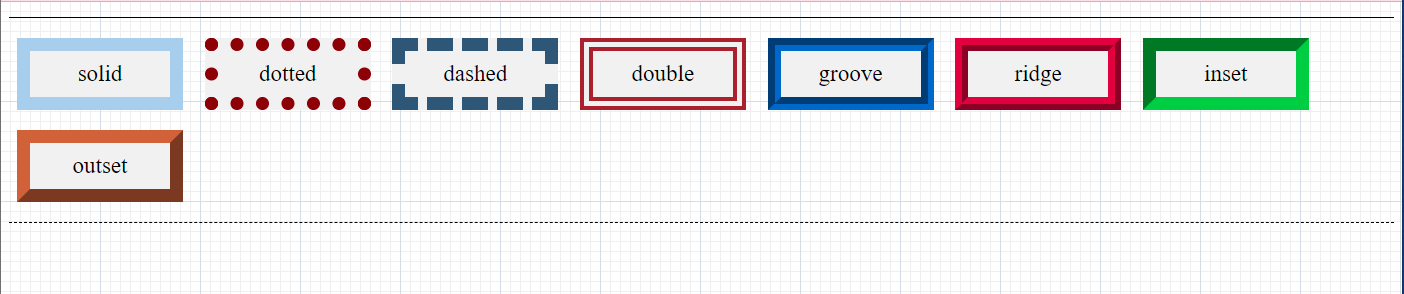
1<!DOCTYPE html>2<html lang="ko">3<head>4<meta charset="utf-8">5<title>테두리 모양</title>6<style type="text/css">7  body { background:url(img/bg_grid.png); }8
9</style>10</head>11<body>12 <div class="brdr">13 <p class="p1">solid</p>14 <p class="p2">dotted</p>15 <p class="p3">dashed</p>16 <p class="p4">double</p>17 <p class="p5">groove</p>18 <p class="p6">ridge</p>19 <p class="p7">inset</p>20 <p class="p8">outset</p>21 </div>22</body>23</html>1<!DOCTYPE html>2<html lang="ko">3
4<head>5 <meta charset="utf-8">6 <title>테두리 모양</title>7 <style type="text/css">8 body {9 background: url(img/bg_grid.png);10 }11
12 .brdr {13 border: 2px solid #ccc;14 border-top: 1px solid #000;15 border-bottom: 1px solid #000;16 /* 너비500px 수평중앙정렬 */17 width: 500px;18 margin: auto;19 }20
21 p {22 width: 120px;23 width: 94px;24 display: inline-block;25 padding: 10px;26 text-align: center;27 background: rgb(194, 208, 232);28 font: 23px Times;29 margin:10px 8px;30 border-width:13px;31 border-color:firebrick;32 border-style:solid;33 border:13px firebrick solid;34 }35 .p1{border-style:solid;}36 .p2{border-style:dotted;}37 .p3{border-style:dashed;}38 .p4{border-style:double;}39 .p5{border-style:groove;}40 .p6{border-style:ridge;}41 .p7{border-style:inset;}42 .p8{border-style:outset;}43 </style>44</head>45
46<body>47 <div class="brdr">48 <p class="p1">solid</p>49 <p class="p2">dotted</p>50 <p class="p3">dashed</p>51 <p class="p4">double</p>52 <p class="p5">groove</p>53 <p class="p6">ridge</p>54 <p class="p7">inset</p>55 <p class="p8">outset</p>56 </div>57</body>58
59</html>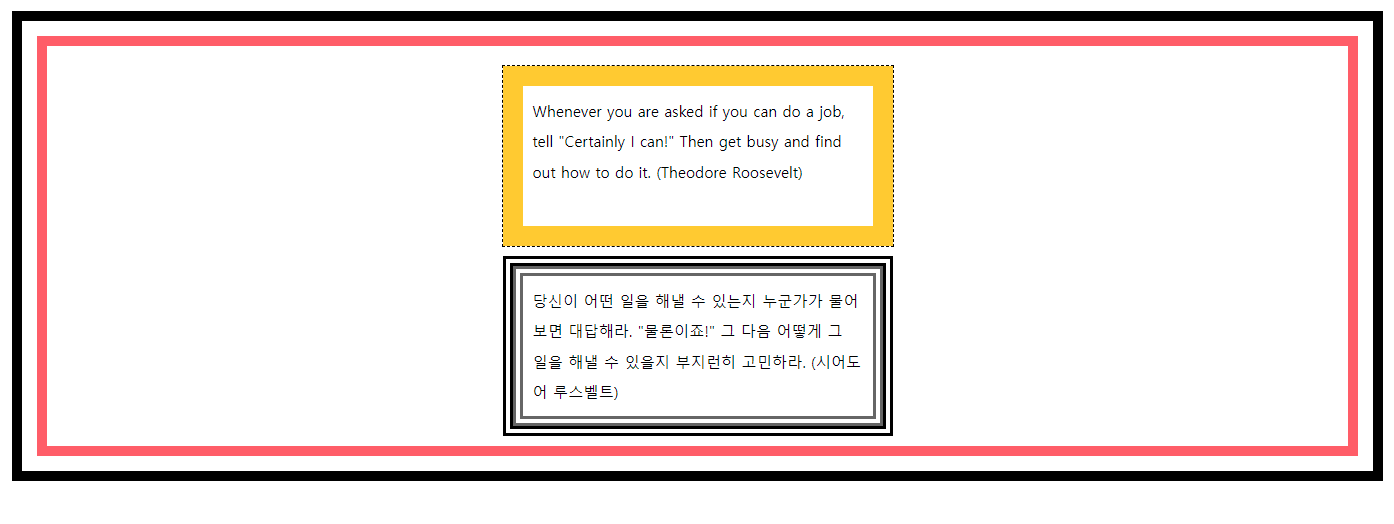
1<!DOCTYPE HTML>2<html>3 <head>4 <title> 테두리 외곽에 아우트라인 처리하기 </title>5 <meta charset="UTF-8" />6 <style type="text/css">7
8 </style>9 </head>10
11 <body>12 <div>13 <p class="border1">14 Whenever you are asked if you can do a job, tell15 "Certainly I can!" Then get busy and find out how to do it.16 (Theodore Roosevelt)17 </p>18 <p class="border2">19 당신이 어떤 일을 해낼 수 있는지 누군가가 물어보면 대답해라.20 "물론이죠!" 그 다음 어떻게 그 일을 해낼 수 있을지 부지런히 고민하라.21 (시어도어 루스벨트)22 </p>23 </div>24 </body>25</html>1<!DOCTYPE html>2<html>3 <head>4 <title>테두리 외곽에 아우트라인 처리하기</title>5 <meta charset="UTF-8" />6 <style type="text/css">7 body {8 font:0.95em "맑은 고딕",sans-serif;9 margin:40px;10 }11 div{12 border:10px solid #ff6666;13 outline-width:10px;14 outline-style:solid;15 outline-offset:15px;16 outline-color:#ff6666;17 padding:40px;18 }19 p{20 line-height: 200%;21 padding:10px;22 width:330px;23 height: 120px;24 margin: 0 auto;25 }26 .border1{27 border:20px solid #ffcc00;28 outline: dashed 1px #000;29 margin-bottom: 20px;30 }31 .border2{32 border:10px double #ffcc00;33 outline: double 10px rgb(10, 33, 240);34 }35 </style>36 </head>37
38 <body>39 <div>40 <p class="border1">41 Whenever you are asked if you can do a job, tell "Certainly I42 can!" Then get busy and find out how to do it. (Theodore Roosevelt)43 </p>44 <p class="border2">45 당신이 어떤 일을 해낼 수 있는지 누군가가 물어보면 대답해라.46 "물론이죠!" 그 다음 어떻게 그 일을 해낼 수 있을지 부지런히47 고민하라. (시어도어 루스벨트)48 </p>49 </div>50 </body>51</html>04. border-radius
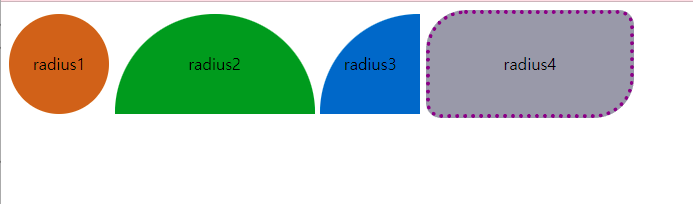
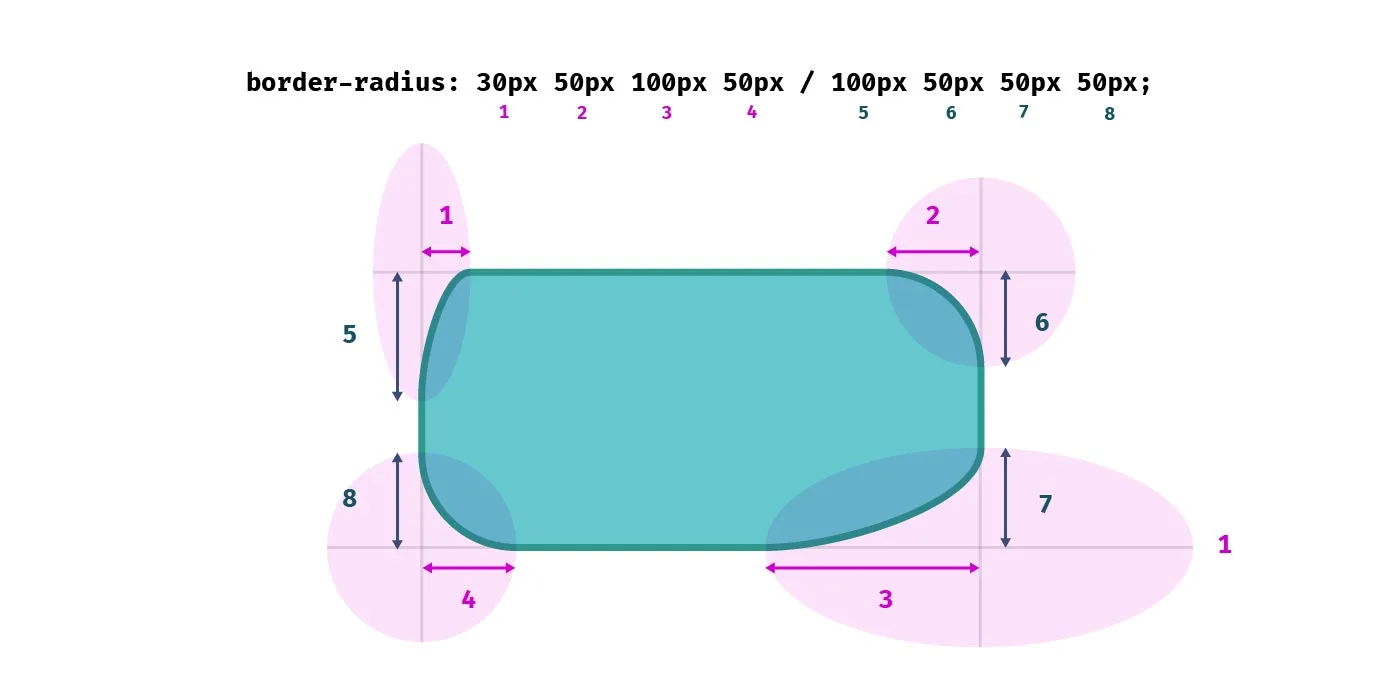
1<!DOCTYPE html>2<html lang="ko">3<head>4<meta charset="utf-8">5<title>둥근 테두리</title>6<style type="text/css">7
8</style>9</head>10<body>11 <span class="radius radius1">radius1</span>12 <span class="radius radius2">radius2</span>13 <span class="radius radius3">radius3</span>14 <span class="radius radius4">radius4</span>15</body>16</html>1<!DOCTYPE html>2<html lang="ko">3 <head>4 <meta charset="utf-8" />5 <title>둥근 테두리</title>6 <style type="text/css">7 .radius {8 display: inline-block;9 text-align: center;10 line-height: 100px;11 }12 .radius1 {13 width: 100px;14 height: 100px;15 background-color: #cc6;16 border-radius: 100px;17 }18 .radius2 {19 width: 200px;20 height: 100px;21 border-radius: 100px 100px 0 0;22 background-color: cadetblue;23 }24 .radius3 {25 width: 100px;26 height: 100px;27 border-radius: 200px 0 0 0;28 background-color: #d14419;29 }30 .radius4 {31 width: 200px;32 height: 100px;33 background-color: cadetblue;34 border-radius: 40px 15px 50px;35 border: 4px dotted #800;36 }37
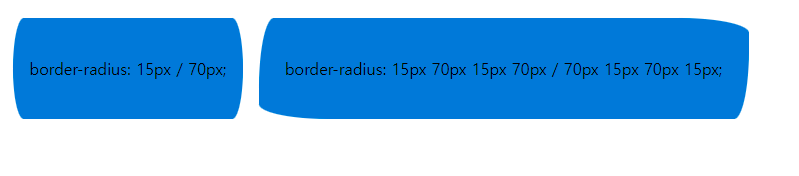
38 /*39 3개 -> 좌상 우상+좌하 우하40 2개 -> 좌상+우하 우상+좌하41 */42 span:nth-child(5),43 span:nth-child(6) {44 display: block;45 width: 430px;46 height: 100px;47 background: pink;48 margin: 10px auto;49 }50 .radius5 {51 border-radius: 15px / 70px;52 }53 .radius6 {54 border-radius: 15px 70px 15px 70px / 70px 15px 70px 15px;55 }56 </style>57 </head>58 <body>59 <span class="radius radius1">radius1</span>60 <span class="radius radius2">radius2</span>61 <span class="radius radius3">radius3</span>62 <span class="radius radius4">radius4</span>63 <span class="radius radius5">radius5 ///width:430px;height:100px; </span>64 <span class="radius radius6">radius6</span>65 </body>66</html>05. border-image
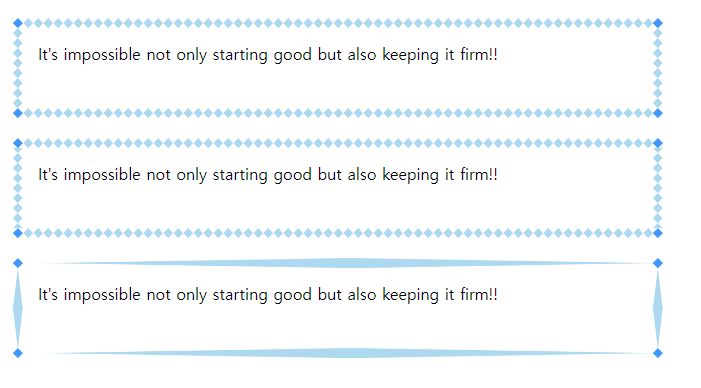
1<!DOCTYPE html>2<html lang="ko">3<head>4<meta charset="utf-8">5<title>테두리 이미지</title>6<style type="text/css">7
8</style>9</head>10<body>11 <div class="round">12 It's impossible not only starting good but also keeping it firm!!</div>13 <div class="repeat">14 It's impossible not only starting good but also keeping it firm!!</div>15 <div class="stretch">16 It's impossible not only starting good but also keeping it firm!!</div>17</body>18</html>1<!DOCTYPE html>2<html lang="ko">3 <head>4 <meta charset="utf-8" />5 <title>테두리 이미지</title>6 <style type="text/css">7 body {8 margin: 20px;9 }10 div {11 width: 600px;12 height: 50px;13 padding: 15px;14 border: 10px solid transparent;15 }16 .round {17 border-image: url(img/border.png) 20;18 /* 이미지 | 슬라이스 */19 border-image: linear-gradient(red, blue) 27;20 }21 .repeat {22 border-image: url(img/border.png) 20 repeat;23 }24 .stretch {25 border-image: url(img/border.png) 20 stretch;26 }27 </style>28 </head>29 <body>30 <div class="round">31 It's impossible not only starting good but also keeping it firm!!32 </div>33 <div class="repeat">34 It's impossible not only starting good but also keeping it firm!!35 </div>36 <div class="stretch">37 It's impossible not only starting good but also keeping it firm!!38 </div>39 </body>40</html>예제
정보
📁 0307-border-image 시작파일
1<!DOCTYPE HTML>2<html lang="en">3
4<head>5  <meta http-equiv="Content-Type" content="text/html; charset=utf-8">6  <title>Border Image</title>7  <style>8    div {9      /* 단위 안쓰면 px */10      border-image: url(border.jpg) 45 fill / auto repeat;11      width: 600px;12      height: 300px;13      margin: 150px auto;14    }15  </style>16</head>17
18<body>19  <div></div>20</body>21
22</html>
border-image-slice
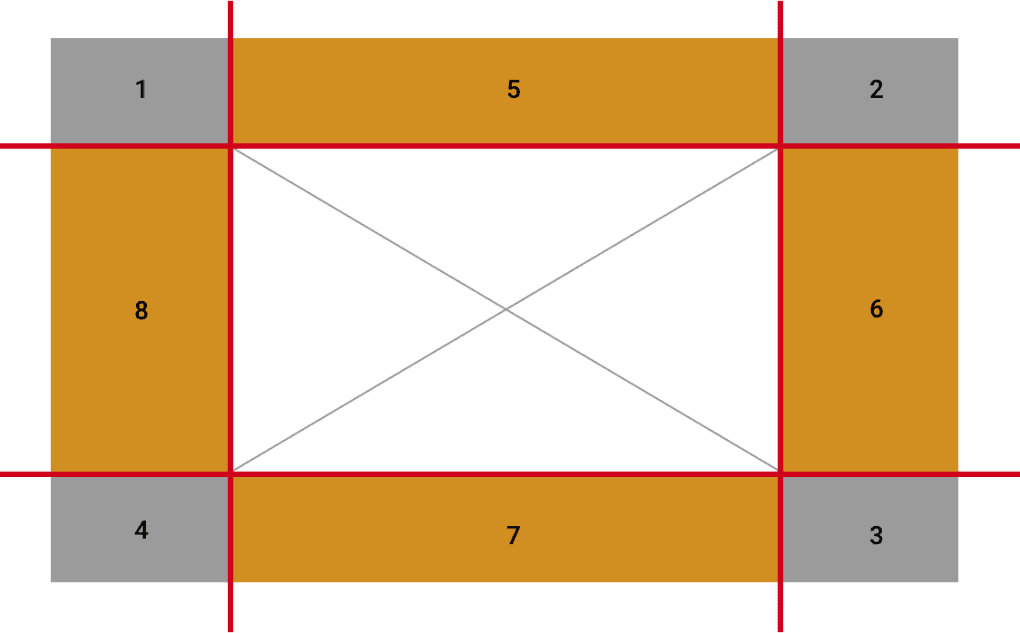
border-image-slice : 브라우저에게 테두리 조각을 만들기 위해 이미지를 슬라이스할 위치를 알려준다.
/* 모든 방향 */border-image-slice: 30%;
/* 세로방향 | 가로방향 */border-image-slice: 10% 30%;
/* 위 | 가로방향 | 아래 */border-image-slice: 30 30% 45;
/* 위 | 오른쪽 | 아래 | 왼쪽 */border-image-slice: 7 12 14 5;
/* `fill` 키워드 */border-image-slice: 10% fill 7 12;
/* 전역 값 */border-image-slice: inherit;border-image-slice: initial;border-image-slice: unset;
이미지는 4개 모서리, 4개 측면, 중앙의 9개 섹션으로 나뉜다.
브라우저에게 테두리 조각을 만들기 위해 이미지를 슬라이스할 위치를 알려준다.
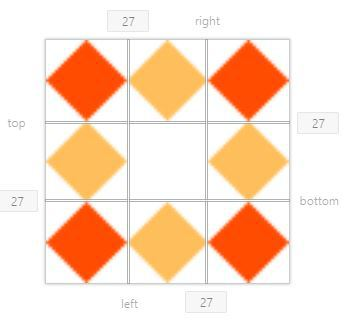
border-image-slice: [ number | percentage ] | fill | initial | inherit
06. box-sizing
정보
👁️🗨️ 박스의 크기계산 기준설정
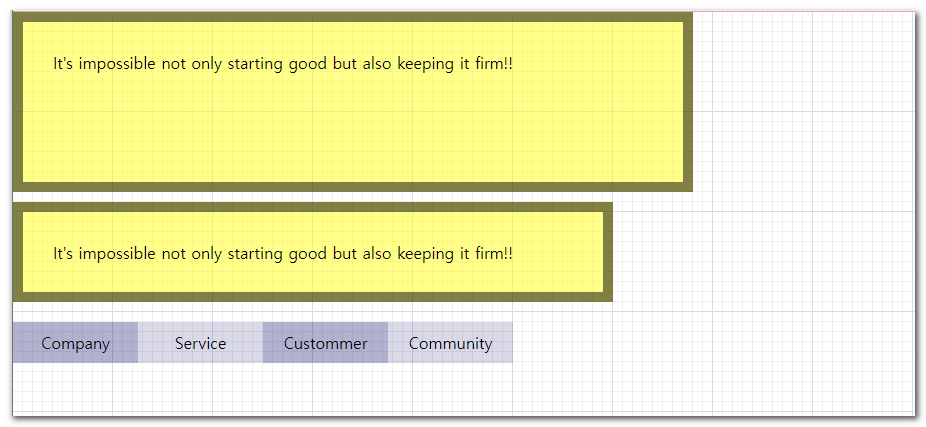
1<!DOCTYPE html>2<html lang="ko">3<head>4<meta charset="utf-8">5<title>box-sizing</title>6<style type="text/css">7    * { margin: 0; padding: 0; }8    body { background: url(img/bg_grid.png); }9
10</style>11</head>12<body>13 <p>It's impossible not only starting good but also keeping it firm!!</p>14 <p class="sizing">It's impossible not only starting good but also keeping it firm!!</p>15 <ul class="sizing_list">16 <li><a href="#">Company</a></li>17 <li><a href="#">Service</a></li>18 <li><a href="#">Custommer</a></li>19 <li><a href="#">Community</a></li>20 </ul>21</body>22</html>1<!DOCTYPE html>2<html lang="ko">3 <head>4 <meta charset="utf-8" />5 <title>box-sizing</title>6 <style type="text/css">7 * {8 margin: 0;9 padding: 0;10 border: 0;11 }12 body {13 background: url(img/bg_grid.png);14 }15 p {16 background-color: rgba(255,255,0,.5);17 border:10px solid rgba(0,0,0,0.5);18 width:600px;19 height:100px;20 padding:30px;21 margin-bottom: 10px;22 }23 .sizing{24 /* box-sizing :25 border-box26 크기=패딩+보더+콘텐츠박스27 content-box28 크기=(패딩)+(보더)+(콘텐츠박스 )29 */30 width:500px;31 height:200px;32 padding:50px;33 border:15px solid red;34 box-sizing: border-box;35 overflow: hidden;36 }37 .sizing_list{38 width:500px;39 margin-top: 20px;40 margin: auto;41 }42 .sizing_list li{43 list-style: none;44 width:25%;45 float:left;46 background: rgba(0,0,0,0.5);47 padding:10px;48 box-sizing: border-box;49 text-align: center;50 }51 .sizing_list li a{52 text-decoration: none;53 color:#fff;54 }55 .sizing_list li:hover a{56 text-decoration: underline;57 color:#fff;58 }59 .sizing_list li:nth-child(odd){60 background: rgba(219, 95, 95, 0.5);61 }62 </style>63 </head>64 <body>65 <p>It's impossible not only starting good but also keeping it firm!!</p>66 <p class="sizing">67 It's impossible not only starting good but also keeping it firm!!68 </p>69 <ul class="sizing_list">70 <li><a href="#">Company</a></li>71 <li><a href="#">Service</a></li>72 <li><a href="#">Custommer</a></li>73 <li><a href="#">Community</a></li>74 </ul>75 </body>76</html>07. box-shadow
정보
👁️🗨️ 박스 그림자
1선택자 { box-shadow: Inset Horizontal-offset Vertical-offset Blur-Radius Spread Shadow-Color; }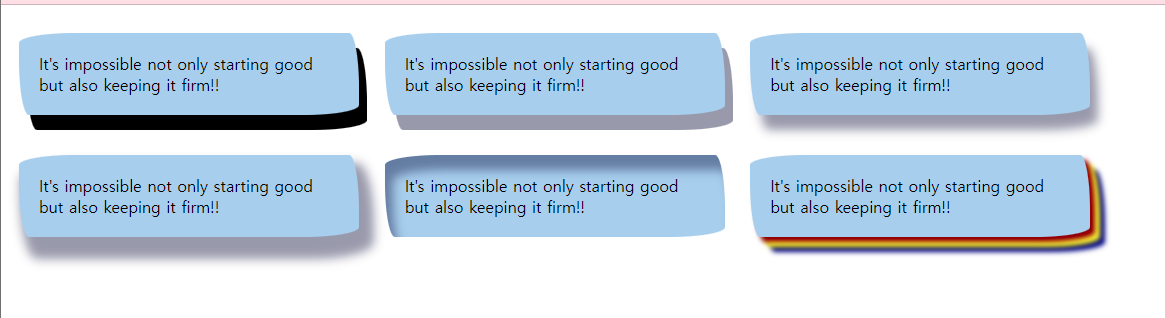
1<!DOCTYPE html>2<html lang="ko">3<head>4<meta charset="utf-8">5<title>box-shadow</title>6<style type="text/css">7
8</style>9</head>10<body>11 <p class="shadow1">It's impossible not only starting good but also keeping it firm!!</p>12 <p class="shadow2">It's impossible not only starting good but also keeping it firm!!</p>13 <p class="shadow3">It's impossible not only starting good but also keeping it firm!!</p>14 <p class="shadow4">It's impossible not only starting good but also keeping it firm!!</p>15 <p class="shadow5">It's impossible not only starting good but also keeping it firm!!</p>16 <p class="shadow6">It's impossible not only starting good but also keeping it firm!!</p>17</body>18</html>08. tranform
정보
👁️🗨️ 변형
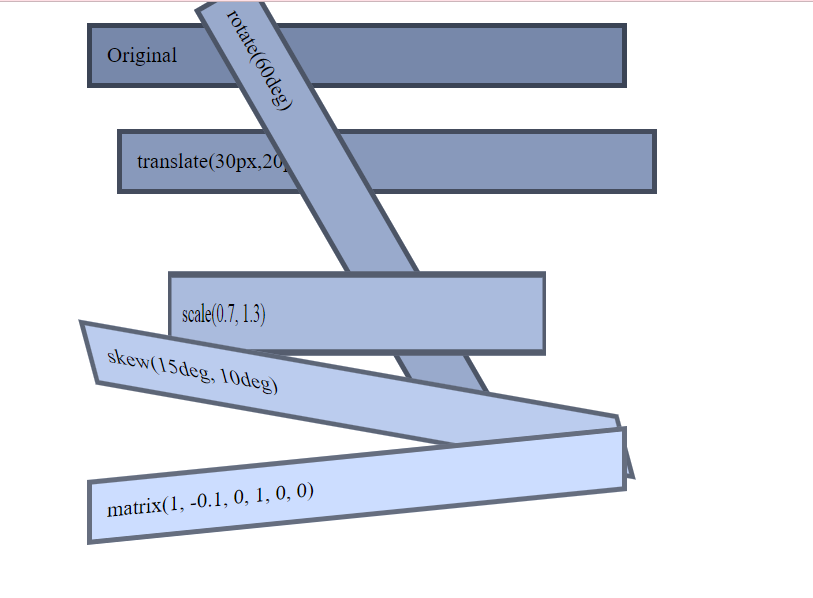
1<!DOCTYPE html>2<html lang="ko">3<head>4<meta charset="utf-8">5<title>TRANSFORM</title>6<style type="text/css">7
8
9</style>10</head>11<body>12 <p>Original</p>13 <p class="t1">translate(30px,20px)</p>14 <p class="t2">rotate(60deg)</p>15 <p class="t3">scale(0.7, 1.3)</p>16 <p class="t4">skew(15deg, 10deg)</p>17 <p class="t5">matrix(1, -0.1, 0, 1, 0, 0)</p>18</body>19</html>1<!DOCTYPE html>2<html lang="ko">3 <head>4 <meta charset="utf-8" />5 <title>TRANSFORM</title>6 <style>7 body {8 margin-left: 100px;9 }10 p {11 width: 500px;12 padding: 15px;13 background: #78a;14 border: 5px solid rgba(0, 0, 0, 0.5);15 font: 21px Times;16 }17 .t1 {18 /* 위치 x,y */19 -ms-transform: translate(-30px, -20px);20 transform: translate(-30px, -20px);21 }22 .t2 {23 /* 각도 deg */24 transform: rotate(-30deg);25 }26 .t3 {27 transform: scale(0.7, 1.3) rotate(45deg);28 }29 .t4 {30 transform: skew(-30deg, -10deg);31 }32 .t5 {33 /* scaleX, scaleY, skewX, skewY,translateX, translateY, */34 transform: matrix(1, -0.1, 0, 1, 0, 0);35 }36 </style>37 </head>38 <body>39 <p>Original</p>40 <p class="t1">translate(30px,20px)</p>41 <p class="t2">rotate(60deg)</p>42 <p class="t3">scale(0.7, 1.3)</p>43 <p class="t4">skew(15deg, 10deg)</p>44 <p class="t5">matrix(1, -0.1, 0, 1, 0, 0)</p>45 </body>46</html>10. transition
정보
👁️🗨️ 전이
1<!DOCTYPE html>2<html lang="ko">3<head>4<meta charset="utf-8">5<title>TRANSITION</title>6<style type="text/css">7
8</style>9</head>10<body>11 <h3>Moving menu</h3>12 <ul class="menu">13 <li><a href="#">Company</a></li>14 <li><a href="#">Product</a></li>15 <li><a href="#">Service</a></li>16 <li><a href="#">Customer Support</a></li>17 <li><a href="#">Community</a></li>18 </ul>19</body>20</html>1<!DOCTYPE html>2<html lang="ko">3 <head>4 <meta charset="utf-8" />5 <title>TRANSITION</title>6 <style type="text/css">7 .menu li {8 list-style: none;9 }10 .menu li a {11 text-decoration: none;12 width: 300px;13 height: 20px;14 padding: 10px;15 display: block;16 background: #fcc;17 margin-bottom: 5px;18 color: #080872;19 transition: all 1s;20 transform: scale(1);21 }22 .menu li a:hover {23 width: 450px;24 background: #c00;25 color: aqua;26 transform: scale(1.5);27
28 }29 </style>30 </head>31 <body>32 <h3>Moving menu</h3>33 <ul class="menu">34 <li><a href="#">Company</a></li>35 <li><a href="#">Product</a></li>36 <li><a href="#">Service</a></li>37 <li><a href="#">Customer Support</a></li>38 <li><a href="#">Community</a></li>39 </ul>40 </body>41</html>11. animation
정보
👁️🗨️ 애니메이션
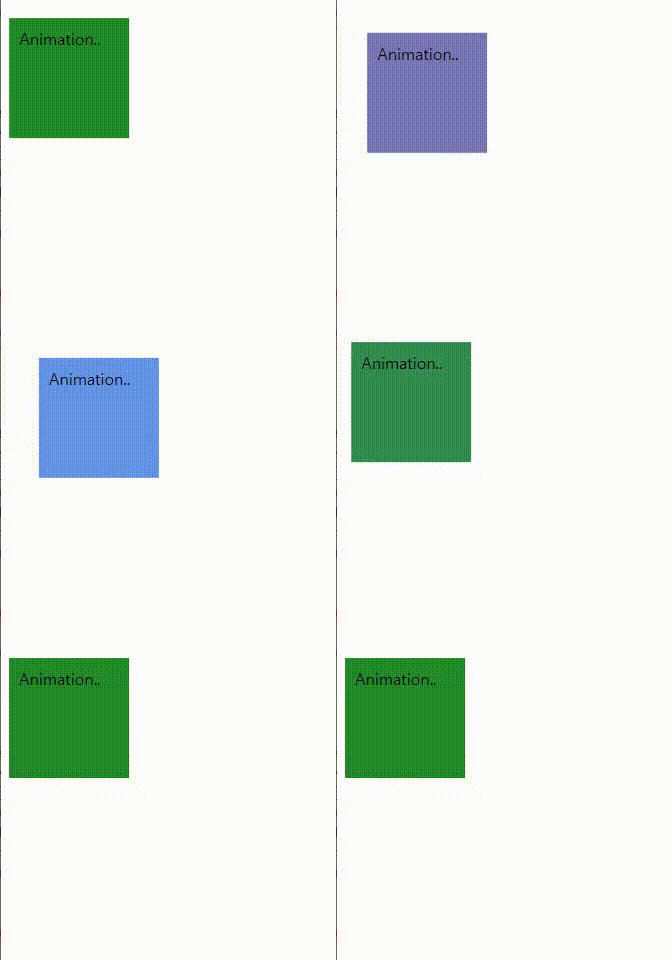
1<!DOCTYPE html>2<html lang="ko">3<head>4<meta charset="utf-8">5<title>ANIMATION</title>6<style type="text/css">7
8</style>9</head>10<body>11 <p>12 Animation..13 </p>14</body>15</html>1<!DOCTYPE html>2<html lang="ko">3 <head>4 <meta charset="utf-8" />5 <title>ANIMATION</title>6 <style type="text/css">7 p {8 width: 100px;9 height: 100px;10 background: brown;11 animation-name: mango;12 animation-duration: 4s;13 animation-fill-mode: forwards;14 animation-iteration-count: 3;15 /* 애니메이션 종료후 반대방향 */16 animation-direction: alternate;17 /* 일단정지 */18 animation-play-state:running ;19 }20 p:hover{21 animation-play-state:paused ;22
23 }24 @keyframes mango {25 0% {26 background: green;27 width: 150px;28 transform: translate(0,0);29 }30 50% {31 background: blue;32 width: 50px;33 transform: translate(0,100px);34
35 }36 100% {37 background-color: blanchedalmond;38 transform: translate(100px,0);39 }40 }41 .ball{42 background-color: red;43 width: 50px;44 height: 50px;45 border-radius: 50px;46 animation: ball 5s 1s infinite alternate cubic-bezier(0.6, 0.39, 0.94, 1.63);47
48 }49 @keyframes ball{50 0%{51 transform: translate(200px, 200px);52 }53 100%{54 transform: translate(0px, 0px);55 }56 }57 </style>58 </head>59 <body>60 <p>Animation..</p>61 <div class="ball"></div>62 </body>63</html>1<!DOCTYPE html>2<html lang="ko">3<head>4<meta charset="utf-8">5<title>ANIMATION2</title>6<style type="text/css">7
8</style>9</head>10<body>11 <div class="ani_box">12 <img class="flower flower1" src="img/ani_spade.png" alt="flower1">13 <img class="flower flower2" src="img/ani_spade.png" alt="flower2">14 </div>15</body>16</html>1<!DOCTYPE html>2<html lang="ko">3 <head>4 <meta charset="utf-8" />5 <title>ANIMATION2</title>6 <style type="text/css">7 /*8 부모요소 - position :relative9 자식요소 - position :absolute10 자식의 기준점이 부모로 바뀜11 */12 .ani_box {13 position: relative;14 width: 100px;15 height: 100px;16 background: url(img/bg_animation.png) no-repeat center;17 }18 .flower {19 position: absolute;20 left: 10px;21 top: 9px;22 }23 .flower1 {24 /* animation: name duration timing-function delay iteration-count direction fill-mode; */25 animation: myani1 3s infinite;26 }27 .flower2 {28 animation: myani2 3s infinite;29 }30 @keyframes myani1 {31 from {32 transform: scale(0.3, 0.3);33 opacity: 0.5;34 }35 to {36 transform: scale(1.2, 1.2);37 opacity: 0;38 }39 }40 @keyframes myani2 {41 from{42 transform:scale(0.5,0.5);43 opacity: 1;44 }45 to{46 transform:scale(1.5,1.5);47 opacity: 0;48 }49 }50 </style>51 </head>52 <body>53 <div class="ani_box">54 <img class="flower flower1" src="img/ani_spade.png" alt="flower1" />55 <img class="flower flower2" src="img/ani_spade.png" alt="flower2" />56 </div>57 </body>58</html>😀SpritesAnimation
1<!DOCTYPE html>2<html lang="ko">3
4<head>5  <meta charset="UTF-8">6  <meta name="viewport" content="width=device-width, initial-scale=1.0">7  <title>Document</title>8  <style>9    #spriteContainer {10      width: 80px;11      height: 80px;12      background-image: url(./img/sprites_final.png);13      background-position: 0, 0;14      animation: sprite .3s steps(24) infinite;15      background-size:2000px ;16    }17
18    @keyframes sprite {19      100% {20        background-position: -1920px;21      }22    }23  </style>24</head>25
26<body>27  <div id="spriteContainer"></div>28</body>29
30</html>
12. 다단편집
정보
👁️🗨️ column

1<!DOCTYPE html>2<html lang="ko">3<head>4<meta charset="utf-8">5<title>다단편집</title>6<style type="text/css">7
8</style>9</head>10<body>11 <div class="gmother">12 <h2>우리 형수님 <sup>발꿈치</sup> 땅에 닿기를... </h2>13 <p>증조할머니께서는 몹시 아프셨다. 선비인 증조할아버지는 세 번째 부인마저 잃을까 봐 한번 올린 반찬을 그 이후로는 올리지 못하게 할 정도로 부인을 아꼈다.<br /> 할머니는 선비 시아버지와 병든 시어머니가 돕지 않는 일을 혼자 맡아 가사를 꾸리셨다. 할머니의 시동생 되는 이도 "우리 형수님 발뒤꿈치가 땅에 닿는 것 좀 보았으면 좋겠다." 라고 할 정도로 늘 바쁘게 종종걸음으로 다니셨다. 농사일은 물론이고 여자의 몸으로 소까지 몰며 시장에 가서 잡다한 먹거리를 사는 일까지 모두가 할머니 몫이었다.<br /> 게다가 배다른 큰 동서의 푸념을 들어야 했다. 제사 때마다 시아버지가 따로 지어 나온 새집에 와서 돌아가신 시어머니 제사를 지어야 했던 동서는 새집에서 시부모를 모시고 있는 할머니에 자신의 처지를 비교하며 헌 집에 사는 자기네를 "다 파먹은 김칫독에 빠졌다." 라고 표현하며 투덜대곤 하였다.<br /> 할머니는 가끔 그때 일을 이야기하시며 "제사 지낼 때는 묵묵히 조용히 지낼 뿐 군소리해서 좋을 게 없다." 라고 말씀하셨고 어머니와 작은어머니들에게 주지시키셨다.</p>14 </div>15</body>16</html>1<!DOCTYPE html>2<html lang="ko">3 <head>4 <meta charset="utf-8" />5 <title>다단편집</title>6 <style type="text/css">7 div,8 h2,9 p {10 margin:0;11 padding:0;12 }13 body{14 margin:10px;15 }16 h2{17 padding:0 0 20px;18 text-align: center;19 }20 .gmother{21 text-align: justify;22 padding: 20px;23 background: #f5f3eb;24 column-count: 3;25 column-gap: 30px;26 column-rule: 2px dashed chocolate;27 }28 .gmother h2{29 column-span:all ; /* all ,none*/30 }31 </style>32 </head>33 <body>34 <div class="gmother">35 <h2>우리 형수님 <sup>발꿈치</sup> 땅에 닿기를...</h2>36 <p>37 증조할머니께서는 몹시 아프셨다. 선비인 증조할아버지는 세 번째 부인마저38 잃을까 봐 한번 올린 반찬을 그 이후로는 올리지 못하게 할 정도로 부인을39 아꼈다.<br />40 할머니는 선비 시아버지와 병든 시어머니가 돕지 않는 일을 혼자 맡아 가사를41 꾸리셨다. 할머니의 시동생 되는 이도 "우리 형수님 발뒤꿈치가 땅에 닿는 것42 좀 보았으면 좋겠다." 라고 할 정도로 늘 바쁘게 종종걸음으로 다니셨다.43 농사일은 물론이고 여자의 몸으로 소까지 몰며 시장에 가서 잡다한 먹거리를44 사는 일까지 모두가 할머니 몫이었다.<br />45 게다가 배다른 큰 동서의 푸념을 들어야 했다. 제사 때마다 시아버지가 따로46 지어 나온 새집에 와서 돌아가신 시어머니 제사를 지어야 했던 동서는47 새집에서 시부모를 모시고 있는 할머니에 자신의 처지를 비교하며 헌 집에48 사는 자기네를 "다 파먹은 김칫독에 빠졌다." 라고 표현하며 투덜대곤49 하였다.<br />50 할머니는 가끔 그때 일을 이야기하시며 "제사 지낼 때는 묵묵히 조용히 지낼51 뿐 군소리해서 좋을 게 없다." 라고 말씀하셨고 어머니와 작은어머니들에게52 주지시키셨다.53 </p>54 </div>55 </body>56</html>13. 종합예제-calc
정보
👁️🗨️ 컨텐츠의 양과 무관하게 항상 아래에 위치하는 푸터만들기
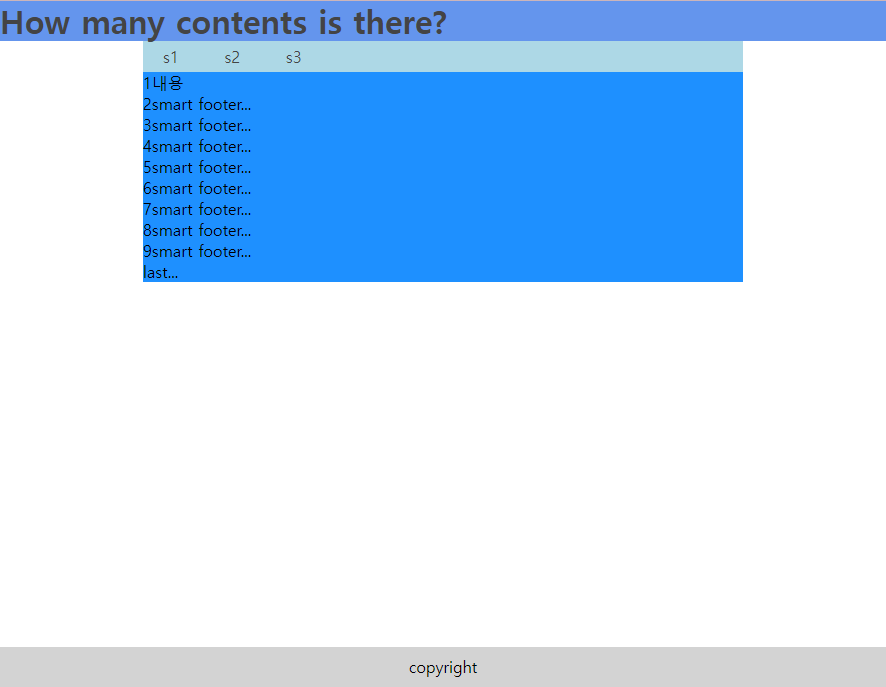
1<!DOCTYPE html>2<html lang="ko">3<head>4<meta charset="utf-8">5<title>똑똑한 FOOTER</title>6<style type="text/css">7    body,header,div,footer,h1,p,ul,li {margin:0; padding:0;}8    li {list-style-type:none;}9
10</style>11</head>12<body>13    <div id="wrap">14        <header>15            <h1><a href="#">How many contents is there?</a></h1>16        </header>17        <div id="container">18            <ul class="lnb">19                <li><a href="#">s1</a></li>20                <li><a href="#">s2</a></li>21                <li><a href="#">s3</a></li>22            </ul>23            <div class="content_area">24                <p>1내용<br> 2smart footer...<br> 3smart footer...<br> 4smart footer...<br> 5smart footer...<br> 6smart footer...<br> 7smart footer...<br> 8smart footer...<br> 9smart footer...<br> last...</p>25            </div>26        </div>27        <footer>28            <p>copyright</p>29        </footer>30    </div>31</body>32</html>